Information Architecture in Coralvynx
This page explains how Coralvynx organises the information it holds — how records are structured, how the category hierarchy is built, and how the interface layers relate to the underlying data. It is intended as a reference for users who want to understand the system more deeply before or after an access request.
How information is arranged within the system
Coralvynx uses a hierarchical category structure to organise the information it holds. At the top level, broad category groups define the main divisions of the data set. Within each group, narrower subcategories provide more specific organisation. Individual records sit at the bottom of this hierarchy, assigned to the most appropriate subcategory during the classification process.
This hierarchy is not fixed at a single depth. Some categories contain only one level of subcategory, while others may have two or more levels, depending on the complexity of the information they contain. The depth of the hierarchy at any given point reflects the diversity and granularity of the underlying data.
Users interact with this hierarchy primarily through the category navigation in the review interface. Moving from a top-level group down through subcategories narrows the view until individual records become visible.
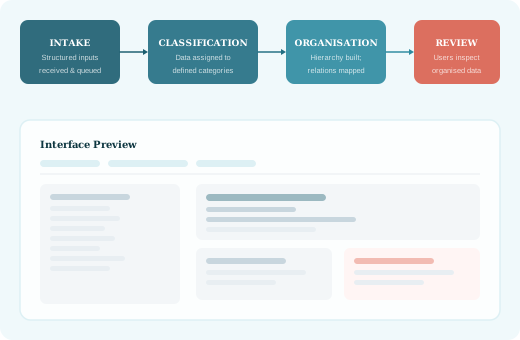
The three tiers of the category hierarchy
Each tier in the Coralvynx hierarchy serves a different purpose in organising and presenting information to users.
Top-level groups
The broadest divisions in the data set. Top-level groups define the major domains of information held within the system. They provide the starting point for navigation and give users a high-level map of the available data.
Subcategories
More specific groupings nested within top-level groups. Subcategories divide each major domain into narrower topics or record types. Most user navigation takes place at this level, where the breadth of data becomes manageable.
Individual records
The atomic unit of information in the Coralvynx system. Each record has been assigned to a specific subcategory during classification. Records can be inspected individually through the review interface.
How the interface layers relate to the data
The Coralvynx interface presents the category hierarchy as a set of navigable panels. Each panel corresponds to a level of the hierarchy. Moving deeper into the hierarchy narrows the displayed data and increases the specificity of the information shown.
The interface includes two main views: a category summary view, which shows the groups and subcategories available at each level, and a record detail view, which shows the full content of an individual record. Users move between these views using the navigation controls provided in the interface.
The interface does not expose the underlying data model directly. Users see only the organised representation of the data, not the raw classification criteria or internal identifiers used by the system.
Navigating between levels
Navigation within the Coralvynx interface is designed to be sequential: users start at the top-level group view and move progressively deeper into the hierarchy. It is also possible to navigate directly to a specific subcategory or record using a search or reference path, where such a path is known.
Breadcrumb navigation shows the current position within the hierarchy and allows users to move back to any previous level without losing their place. This is particularly useful when working with deeply nested subcategories.
A note on updates and revisions
The category hierarchy within Coralvynx may be revised as the system's data set evolves. When a category is restructured, existing records are reassigned to the updated hierarchy. Users may notice that a subcategory they previously accessed has been renamed, merged, or moved to a different top-level group.
Changes to the hierarchy are reflected in the interface immediately once applied. Reference materials within the interface are updated to reflect the current structure. If you notice a discrepancy between the documentation and the interface, please contact the support team.